
Frequently Asked Questions
Can't find what you're looking for? Contact Us
Choose a category to quickly find the help you need
- Select “YES – I’d like to attend this ceremony period”.
- Click on the ‘Login with your zID Microsoft credentials’ button.
- You will be redirected to your Microsoft account for verification. After successful authentication, you will be returned to the Graduation Ceremony Portal to complete your RSVP.
- Complete all 3 steps and review your Order Summary.
- Follow the prompts to add other graduation products/services to your cart (optional).
- Click Proceed to Checkout.
- Complete the checkout prompts to finalise your order.
- If you are attending your ceremony: You will be able to collect your testamur when registering for your ceremony. The testamur collection point will be located in Mathews Pavilion and will be open from 2.5 hours to 30 minutes prior to your ceremony. If you do not collect your testamur in time, you will be provided with a generic ceremony certificate as you cross the stage.
- If you are deferring or not attending your ceremony: You will receive your testamur in the mail 6–8 weeks after the RSVP period has closed. It will be mailed to the mailing address you nominated as part of your RSVP.
- If you are attending a ceremony later: You may have already received your testamur in the mail after your conferral date. If so, please bring it with you on the day to have on stage. If you cannot bring your testamur with you, you will receive a generic ceremony certificate on stage.
- Select “NO – Not attending/deferring to the next ceremony period”.
- Click on the ‘Login with your zID Microsoft credentials’ button.
- You will be redirected to your Microsoft account for verification. After successful authentication, you will be returned to the Graduation Ceremony Portal to complete your RSVP.
- Choose Not Attending or Defer, then select your testamur mailing preference.
- Follow the prompts to add other graduation products/services to your cart (optional).
- Click Proceed to Checkout.
- Complete the checkout prompts to finalise your order.
- Students and guests use different login pathways on the website.
- Students must always log in using their zID and Microsoft credentials. Students are not permitted to create an account using their zID.
- Guests can log in by creating a new account or signing in to an existing account if they have already registered with us.
A Portrait Session is the time you spend with our professional photographer. Your photographer will take a range of different shots and poses of the graduate by themselves, as well as extra shots with family and friends.
Our studios are available before and after the ceremony. You can proceed to the photography area as soon as you have your gown, and immediately after the ceremony. Our studios close (temporarily) strictly 45 minutes before the ceremony commences.
A photo of every graduate is available to view and purchase immediately after the ceremony. A complimentary digital image will be available to claim following your graduation ceremony. To claim and download it, please download the Reed Events App here: Apple Store – iOS and Play Store – Android.
Should you wish to pre-book a stage print and stage frame bundle, you can do so via our website here.
Your pre-booked stage print and stage frame will be available for collection via our Merchandise desk following your ceremony. Please select your stage image to be printed for your bundle via the Reed Events App here: Apple Store – iOS and Play Store – Android following your graduation ceremony.
A link to your graduation ceremony stage video will be shared with you following your graduation day.
Should you require any hotel recommendations for you or your guests for your upcoming graduation, please head to our official Reed Events HotelPlanner website to view and reserve your perfect graduation stay at competitive rates. Should you require assistance with your booking, please contact HotelPlanner Customer Service: VIPres@hotelplanner.com or +61 238 147 692.
To view and order your Portrait Photo Proofs, please use either of the following methods:
METHOD 1: Download the ‘Reed Events’ App (available on the App Store and Google Play Store). Once downloaded, select your university. From here you can use the ‘Picture of you’ feature, where you upload/take a picture of yourself to find your ceremony photos. (This option will also find your stage image and any candid images you were a part of.) Alternatively, you can scroll down to ‘Quick Links’ and type in your ‘G reference code’.
METHOD 2: You will need your reference code starting with ‘G’ to view the images through the “View/Order Portrait Images” button on our website. Once the proofs are available you can start ordering; however, please note it could be up to 5 business days before purchased digital images are available to download.
Whichever method you choose, once you can view your images, select ‘View Details’ to see the purchase options.
If you ordered your digital image via our ‘Reed Events’ App, please follow the steps below:
- Go to the Reed Events App and log in to your account.
- Head to the ‘Me’ section once logged in.
- Select ‘My Orders’, then select ‘View’ on your order. Here you will see a ‘Download’ button on your digital image order.
- Please allow your order to download (Digital Packs can take up to 5 minutes to download). Then go to your ‘Downloads’ folder in your mobile device’s ‘Files’ section.
If you ordered via our website, please follow the steps below:
- Go to our website and log in to your account.
- Click ‘My Account’ in the top right corner, then ‘My Orders’ from the dropdown menu.
- On the order summary page, click the ‘Download’ button next to the relevant order.
- From this link you will be able to save the images to your computer. The images can be downloaded multiple times, if necessary.
Please note: For pre-booked orders and orders placed shortly after graduation, your digital image files will be available to download from “My Account” within 48 hours after your graduation.
Having trouble? Please contact our staff on 1300 361 806.
- Visit unsw.reedgraduations.com.au.
- Click on ‘View/Order Stage Images’.
- Select the date and time of your ceremony, then click GO.
- This will show everyone who crossed the stage. Select your image and then your preferred format (print, digital, etc.).
- Click ‘Add to Cart’ and follow the prompts to checkout.
Reed Events are dedicated to providing only the absolute highest level of quality. Your printed images will be thoughtfully re-touched, carefully packaged and delivered to your door or post office approximately 4 weeks after ordering. Digital images are available online instantly after you place your order. Framed images can take up to 6 weeks due to the nature of creating custom frames.
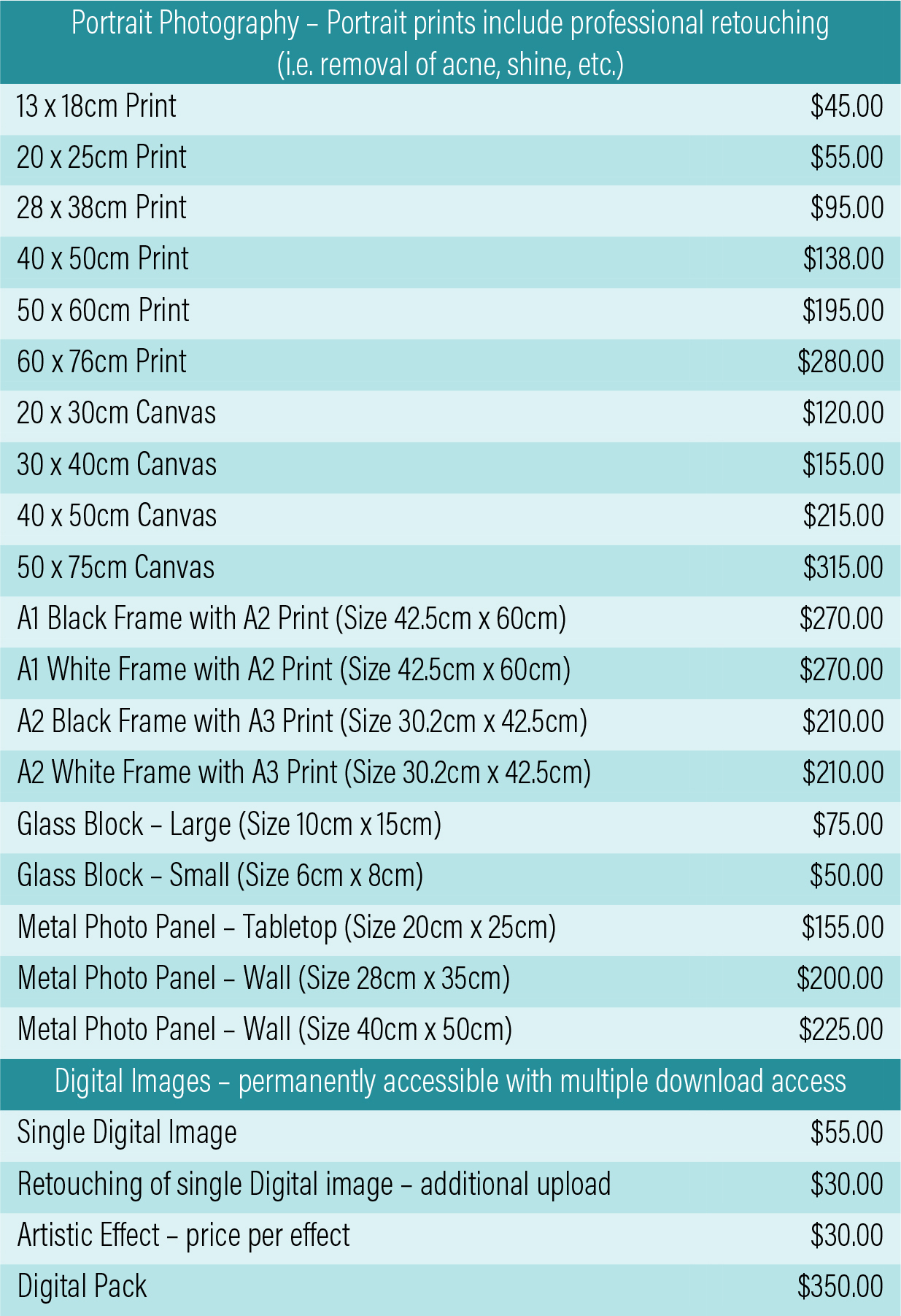
To view our photography price list, please click here. All prices are quoted in Australian Dollars (AUD).
The postage fee varies depending on the item purchased. Digital items do not attract a postage fee.